Vibe Coding: Is Google Antigravity for Non-Coders
Can non-coders use Google Antigravity? Yes, Google Antigravity is designed for vibe coding, where you describe what you want in plain English and AI agents write the code for you. Released November 18, 2025, it’s free during public preview and works for beginners who want to build apps, websites, or tools without learning programming languages like Python or JavaScript.
What is vibe coding? Vibe coding means building software by chatting with AI in everyday language instead of typing code yourself. You describe the “vibe – the what you want and how you want it” or feeling of what you want (like “make me a calculator for expenses that I can speak to instead of writing them”), and the AI creates it.
Do I need coding experience? No, but understanding basic tech concepts helps. Google Antigravity handles all the code writing, but you’ll guide it, test what it makes, and provide feedback—like directing a really smart assistant.
What is Google Antigravity?
Google Antigravity is an agentic development platform powered by Gemini 3 Pro that acts like a smart coding team you manage through conversations. Instead of typing code yourself, you tell AI agents what to build, and they autonomously work across your editor, terminal (command line), and browser to create complete applications.
What does “agentic development platform” mean?
An agentic development platform means the AI works as an independent agent—not just suggesting one line at a time, but planning entire tasks, writing multiple files, running tests, and checking results on its own. Think of it as hiring a junior developer who works super fast but needs your direction and approval.
Is Google Antigravity really an IDE?
Yes, Antigravity is an IDE (Integrated Development Environment)—a fancy term for software where you write and manage code. It’s based on VS Code, which many professional developers use, but adds powerful AI agents that can do most of the work for you through natural language conversations.
What exactly is vibe coding in simple terms?
Vibe coding is when you describe what you want in regular conversation, and AI writes all the code behind the scenes as you see the real app on the screens. Coined by AI researcher Andrej Karpathy in February 2025, it means “programming by vibes”—you provide the feeling and functionality you want, skip writing syntax (programming language rules), and let AI handle technical details.
Can I really build apps without knowing how to code?
Yes, for simple to medium projects. Google Antigravity lets you describe apps in plain English like “build me a todo list with a purple theme” and the AI creates it. However, when things break or need custom features, having some tech understanding helps—or you’ll need to clearly describe problems so the AI can fix them.
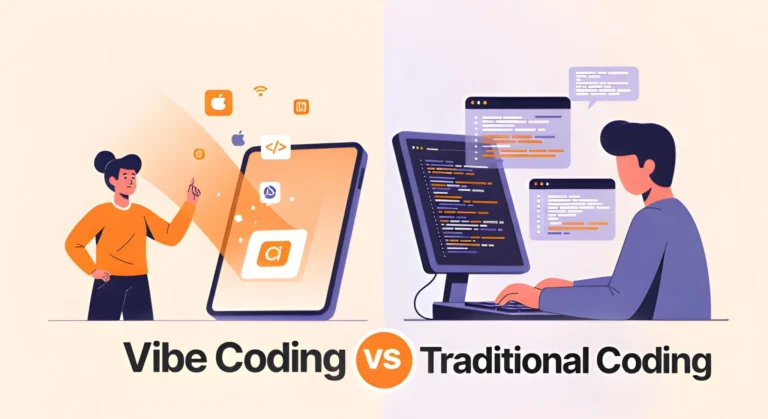
What’s the difference between vibe coding and traditional coding?
Traditional coding means you write every line yourself, learning syntax, debugging errors manually, and understanding how everything connects. Vibe coding means you act as the architect—describing what you want while AI acts as the builder, writing thousands of lines based on your instructions and testing them automatically.
Is vibe coding just for simple projects?
No, people are building surprisingly complex apps with vibe coding. One developer built a complete crypto analysis system with multiple AI agents using Antigravity. However, complex projects require better prompts (instructions), more iterations, and often some technical knowledge to verify the AI’s work makes sense.
Getting Started with Google Antigravity
How do I download and install Google Antigravity?
To use Google Antigravity, you need to download from its official website which is antigravity.google and download the version for your computer (Windows, Mac, or Linux). Install it like any normal software, then sign in with your personal Gmail account. The platform walks you through setup, letting you choose themes and settings—no technical configuration needed.
Is Google Antigravity free to use?
Yes, it’s completely free during public preview with generous usage limits on Gemini 3 Pro. Google refreshes your usage quota every five hours based on how much work agents do, not how many prompts you send. Team and Enterprise plans are coming soon, but individual use remains free for now.
What do I need to get started as a beginner?
You need a personal Gmail account, a computer running Windows, Mac, or Linux, and an idea of what you want to build. That’s it—no programming courses, no expensive tools, no complex setup. The AI handles installing packages, configuring environments, and all the technical plumbing.
Do I need programming skills to use Google Antigravity?
Not required, but helpful. Antigravity handles all the code writing, so you can start immediately. However, learning basic concepts like “what is a variable” or “how do apps and websites work” helps you give better instructions and understand when the AI makes mistakes.
Google Antigravity vs Cursor
How is Google Antigravity different from Cursor?
Cursor excels at helping you code faster by predicting your next edit and answering questions about your codebase—it’s for daily coders who type most code themselves. Antigravity is built for task delegators who want autonomous agents to plan, write, test, and verify entire features while you supervise from a mission control dashboard.
What is the difference between Google Antigravity and Google AI Studio?
Google AI Studio is where you build apps with Gemini models through simple chat. Google Antigravity is a full development platform where AI agents manage complete projects across multiple files, run commands, test in browsers, and produce production-ready applications.
Can I use ChatGPT or Claude instead of Gemini in Antigravity?
Yes! Antigravity supports multiple AI models, including Gemini 3 Pro (default), Anthropic’s Claude Sonnet 4.5, and OpenAI’s GPT-OSS. You can switch the “brain” powering your agents based on which model works best for your specific task or preference.
How does Antigravity compare to tools like Replit or Bolt?
Replit and Bolt are browser-based vibe coding tools, great for quick prototypes—you don’t install anything. Antigravity is a desktop application giving you more power and control, with agents that work across multiple surfaces (editor, terminal, browser) simultaneously and manage complex, multi-file projects better.
What is Gemini 3 Pro and why does it matter?
Gemini 3 Pro is Google’s most intelligent AI model released November 2025, specifically designed for reasoning and coding. It scores 54.2% on terminal benchmarks and tops WebDev Arena leaderboards. Its multimodal abilities mean it can “see” your app’s visual design and understand layout issues better than text-only models.
What does multimodal understanding mean for non-coders?
Multimodal means Gemini 3 can process text, images, video, audio, and code together. For non-coders, this means you can show the AI a screenshot of a design you like and say “make mine look like this,” or it can watch your app run in a browser and identify visual bugs without you explaining them.
How does Google Antigravity verify the code it writes?
Agents in Antigravity don’t just write code—they run it, check output in the browser, capture screenshots, record videos of interactions, run tests, and produce verification artifacts. This thorough testing approach helps build trust that the agent’s work actually functions as intended.
Can I run multiple AI agents at the same time?
Yes! The Agent Manager lets you spin up multiple agents working on different parts of your project simultaneously. One agent might research API options while another refactors your CSS styling, and a third fixes a login bug—all working in parallel like a small development team.
What is the Model Context Protocol in Antigravity?
Model Context Protocol (MCP) lets agents talk to external systems like databases, APIs, and documentation sites in structured ways. For non-coders, this means agents can automatically fetch information they need without you manually pasting documentation or data—they query systems directly.
What are Knowledge Items and how do they help?
Knowledge Items act as long-term memory for your agents. As you work, agents distill recurring patterns, code snippets, and solutions into reusable knowledge bundles. Later projects can reuse these learnings without redoing research, making your agents smarter over time.
Should I try Google Antigravity as a complete beginner?
Yes, if you have realistic expectations. Antigravity is excellent for learning, experimenting, and building simple to medium projects. Start with throwaway weekend projects, test ideas quickly, and gradually understand how apps work. Just don’t use it for critical business systems without expert review.
When should I hire a developer instead of vibe coding?
Hire a developer when building anything handling sensitive data (passwords, payment info), needing strong security, serving many users, requiring complex business logic, or representing your business professionally. Vibe coding excels at prototypes, personal tools, and learning—not production business applications.
What’s the best way to learn while using Antigravity?
Start simple and gradually increase complexity. Ask the AI to explain what it built. Read some of the generated code even if you don’t understand everything. Try modifying small things yourself. Join communities like the GeminiAI subreddit where others share experiences and tips.
Will vibe coding replace professional developers?
No. While vibe coding makes prototyping accessible to everyone, professional developers bring deep understanding of architecture, security, performance, scalability, and debugging complex systems. Think of vibe coding as giving everyone basic construction tools—you still need architects and engineers for skyscrapers.
Google Antigravity is a game-changer
Google Antigravity represents a breakthrough for non-coders interested in building software through vibe coding. Released November 18, 2025, and powered by Gemini 3 Pro, it transforms the IDE from a text editor into mission control for managing autonomous AI agents. By describing what you want in plain English, you can create websites, apps, and tools without learning programming languages.
The platform excels at rapid prototyping, personal projects, and helping beginners understand how software works. Its Agent Manager provides oversight without overwhelming you with code, while artifacts like screenshots, walkthroughs, and task plans make verification accessible. Support for multiple AI models (Gemini 3 Pro, Claude Sonnet 4.5, GPT-OSS) and features like the integrated Chrome browser create a comprehensive development experience.
However, vibe coding has real limitations. Non-coders may struggle with debugging complex issues, identifying security vulnerabilities, and maintaining long-term projects. The approach works best for learning, experimentation, and simple to medium projects—not production business applications handling sensitive data or serving large audiences.
The free public preview makes Antigravity accessible to anyone with a Gmail account and a computer. Whether you’re an entrepreneur testing ideas, a creative building personal tools, or a curious beginner exploring how apps work, Google Antigravity offers an unprecedented opportunity to bring your ideas to life. Just remember that ideas come easy with vibe coding—but execution, security, and maintenance still require thoughtfulness and often some technical understanding.
Ready to try? Download Google Antigravity from antigravity.google and start your first vibe coding project today.